
The Wild Tokyo Casino mobile app offers the full slot catalogue on any supported smartphone or tablet. Players can swap titles without opening a browser. This guide covers the steps to install and run the app, the devices that work, and the slot features that vary from the desktop site. You will understand exactly what to expect before you download.
App-Based Features Specific to Mobile Slots
Push notifications notify you when a progressive jackpot surpasses a threshold you set. This feature is not available on the desktop site. You can adjust alerts per game or disable them entirely in the notification centre. The app also saves favourite slots in a dedicated tab, allowing you jump straight into previously played titles without scrolling the full lobby.
Another mobile-exclusive tool includes the session timer. After 60 minutes of continuous play, a non-dismissible banner is displayed showing elapsed time and current net result. Tapping “Take a Break” freezes the account for the remainder of the day, while “Dismiss” simply hides the banner. This reminder helps players track time without relying on external clocks or device notifications.
Quick-Deposit Shortcut
From within any slot, a balance bar at the top displays your available funds. Tapping the amount launches a compact deposit panel that processes the same payment methods as the desktop cashier. Limits and processing times mirror the website, yet the mobile flow demands fewer screens, lowering the steps from decision to confirmation to three taps.
Login Process and Safety Checks
After installation, the initial screen requests your registered username and password. Two-factor authentication via authenticator app or SMS is accessible and recommended. Enabling it adds approximately five seconds to each login but stops unapproved access if your phone is misplaced. The app saves an coded token on your phone, so you stay logged in for up to 30 days until you manually sign out or wipe the app cache.
Biometric login can be toggled in the settings. Biometric authentication substitutes for password entry on compatible devices, yet the base encryption remains the same to the desktop site. If you share a device with family members, keep biometric unlock disabled to avoid inadvertent access to your balance and transaction history.
Refreshing the App and Troubleshooting
Version numbers show up in the “About” section of the settings menu. When an update is released, Android users see an in-app prompt directing directly to the latest APK. iOS users are redirected to the App Store. Installing over an existing version keeps your login token and favourites list, so no re-entry of credentials is necessary.
Common issues cover failed installation on rooted Android devices and occasional crash reports after OS updates. Clearing the app cache or reinstalling usually resolves these. If a slot stalls mid-spin, force-close the app and relaunch. The round resumes from the last recorded server state, securing your balance from loss. Should problems continue, the in-app chat connects you to support staff who can escalate technical tickets.
Installing and Configuring the App
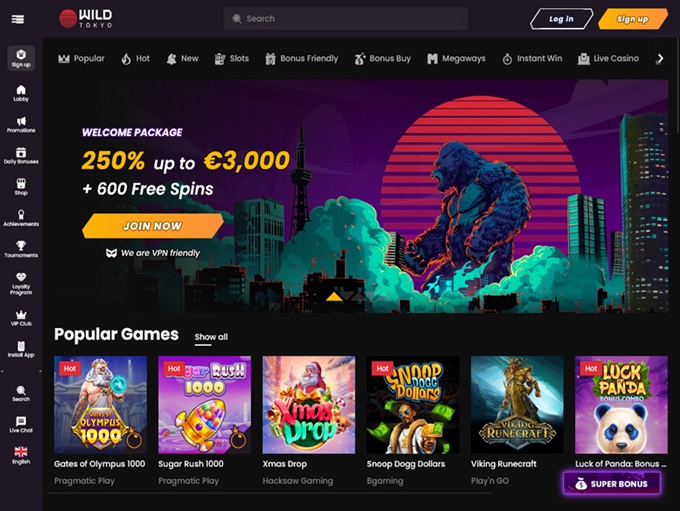
The authorized download link is located at the top of the mobile page. Tapping it opens an APK file for Android or routes iOS users to the App Store. Android installation needs you to enable installs from unknown sources in your security settings. Once the toggle is enabled, the file loads in under a minute on a steady connection. After the icon shows up, access the app and log in with the identical credentials used on the desktop site.
iPhone and iPad users tap “Get” in the App Store and authenticate with Face ID or a passcode. The store version refreshes automatically whenever a new build is released, so manual sideloading is unnecessary. If you sideload an iOS build outside the store, you must re-verify the developer certificate in Settings every seven days. Most players bypass this unnecessary step by staying with the store version.
Slot Layout and Navigation Differences
The mobile slot lobby arranges games into horizontal carousels instead of the desktop grid. Swiping left or right moves through categories such as “New Releases,” “High Volatility,” and “Jackpot Slots.” Touching a tile launches the game in full-screen mode and removes the bottom navigation bar to maximise reel visibility.
Controls adapt to touch input. A large spin button appears at the bottom right, Wild Tokyo Casino, while bet-size selectors show up in a pop-up drawer activated by a gear icon. Pay-table information is one tap away, and most titles include a demo mode toggle that allows you try without wagering. Landscape orientation is supported on every slot tested, but portrait mode remains the default for one-handed play on smaller phones.
Touch-Friendly Reel Mechanics
Each reel can be spun with a vertical swipe if you opt for manual timing over the on-screen button. The app detects swipe velocity, so a quick flick increases spin speed. This option is not present from the desktop version. Autoplay settings launch in a separate modal where you configure the number of spins, loss limit, and single-win ceiling. These limits are stored locally and clear when you close the app, so each session begins with a fresh configuration.
Speed, Data Use and Battery Impact
Slot loading times range between three to six seconds on a 4G connection and two to four seconds on Wi-Fi, according to in-house benchmarks shared on the support page. Once a game is cached, subsequent launches drop below two seconds. Data consumption is between 4 MB and 7 MB per minute of continuous play, depending on animation complexity. Enabling lower-graphics mode in settings cuts that figure by roughly 30 percent.
Battery tests on a recent flagship indicated a 12 percent drain after 45 minutes of medium-volatility slots with full graphics. Switching to battery-saver mode inside the app reduces frame rate and disables certain particle effects, prolonging playtime by about 25 percent. If you notice overheating, close background apps and lower screen brightness before continuing.
Device Support and Operating Systems

Ensure that your handset satisfies the minimum requirements provided on the app page. The current build operates on Android 7.0 or newer and iOS 12 or later. Older firmware prevents installation or leads to crashes during longer sessions. Most mid-range and flagship phones introduced after 2018 satisfy these thresholds. Some budget tablets with limited RAM perform slower when several large slot games are stored in cache.
Screen-size tests demonstrate stable performance on displays between 5 and 10 inches. Aspect ratios from 16:9 to 18:9 adapt automatically, so graphics stay undistorted. Foldable devices switch orientation when the screen unfolds, but you may need to restart a slot round for the interface to re-align. Wild Tokyo Casino does not publish an exhaustive device list, so the safest check is to perform the install and check for error messages on the launch screen.
Selecting the Right Mobile Slot for Your Play Style
Picking a slot that fits your chosen pace and risk level is easier once you comprehend the mobile filters. The lobby allows you to sort by volatility, RTP range, and jackpot size, each filter refreshing the carousel in real time. I usually begin with the volatility slider set to medium, then scan the displayed RTP values to keep above 96 percent. This quick check stops me from playing low-return games that can drain a session faster than predicted.
Then, I check the pay-table preview before loading the full game. The mobile preview shows the top three winning combinations and their multipliers, providing me a accurate sense of prize distribution without investing funds. If the preview displays only small, frequent wins, I move on. If it indicates occasional larger multipliers, I start the demo to check reel rhythm on my specific handset.
Essential Factors to Evaluate Before You Spin
- Variance rating displayed in the filter panel
- RTP percentage displayed under each tile
- Jackpot type—fixed or progressive—and current seed amount
- Maximum bet per spin to ensure it matches your bankroll plan
- Presence of bonus buy option if you like skipping base-game build-up
Once the app is loaded and configured, the quickest way to determine whether it suits your play style is to open a single slot, use the built-in demo for ten spins, and observe both loading speed and touch responsiveness. If the experience appears smooth, continue to a funded session. If not, the desktop site is fully functional while you resolve or await the next update.